
In short: Odoo's Fleet app manages vehicles, drivers, services and odometer readings. Booking a consignment, dispatching a trip, proving a delivery and settling a driver's cash are outside what it does. This article walks through an Odoo transport management system built to cover that ground: the Transport Management System (TMS) from Do Incredible, a suite for Odoo 19 and Odoo 20 with 48 modules, a Community-edition core, five country packs and a REST API, all writing to standard Odoo records. We follow one consignment from enquiry to invoice and driver settlement, show where the controls sit, and suggest a staged rollout.
Table of Contents
- Watch the video walkthrough
- Why freight operations outgrow spreadsheets and chat groups
- Built on Odoo, not beside it
- One consignment, from enquiry to settlement
- Which modules to install, and in what order
- Controls, approvals and the audit trail
- Country packs and statutory documents
- What customers and drivers see
- Dashboards and integration
- Where this fits among Odoo TMS options
- Pricing and what to check before you buy
- Frequently asked questions
- Talk to us
Watch the video walkthrough
Prefer to see it first? This video from our YouTube channel covers the Transport Management System for Odoo 19: the TMS, fleet, logistics, GPS tracking and billing. The text and screenshots below follow the same flow.
Video: Odoo 19 Transport Management System | Complete TMS, Fleet, Logistics, GPS Tracking & Billing (YouTube, Do Incredible).
Why freight operations outgrow spreadsheets and chat groups
A freight job is a chain of handovers. The customer asks for a rate, the desk books it, the dispatcher finds a vehicle, the driver delivers, someone chases the signed proof, accounts raises the invoice, and the driver's cash advance is settled days later. Each link is simple. The trouble starts when each one lives somewhere different: the rate in a spreadsheet, the trip in a chat group, the proof as a photo on somebody's phone, the driver's advance in a notebook.
Then a plain question, such as what a trip earned or why a consignment has not been billed, becomes an afternoon of reconstruction. The table shows where a connected system changes the answer. Every entry on the right comes from what the suite's Odoo Apps listing says it does.
| Where it usually breaks | What the suite does instead |
|---|---|
| A rate is quoted from memory or an old sheet. | The rating engine resolves charges in a fixed order (customer contract, customer tariff, standing tariff, then manual) and shows a margin preview before you commit. |
| A vehicle leaves with expired papers or the wrong driver. | A dispatch gate checks vehicle documents, driver licence class, capacity and cargo-to-vehicle fit. Overriding it needs an approval. |
| "Has it been delivered?" is answered by phone. | A delivery counts only once the electronic proof of delivery (ePOD) is submitted, and verifying it is what opens billing. |
| Invoices wait for paperwork nobody can find. | A billing workbench lists what is billable and what is blocking each consignment. |
| Detention time is never charged. | Detention is calculated from the actual dwell at each stop, with the evidence stored on the invoice line. |
| Driver cash is settled from memory. | Advances, expenses and cash on delivery are tied to the trip and to a driver ledger, and settlement is blocked until it balances. |
Built on Odoo, not beside it
The design decision that matters most is easy to miss. According to the module listing, drivers are hr.employee records, vehicles are fleet.vehicle, invoices and vendor bills are account.move, hired vehicles are purchase.order and expenses are hr.expense. New models exist only where Odoo has no equivalent: the consignment note, the trip, the tariff matrix and the telemetry log.
For a finance team that means a freight invoice is an ordinary Odoo customer invoice. The billing module takes taxes only from the fiscal position and has no tax arithmetic of its own. The same principle sits behind our garage management system: put the industry logic on top of Odoo's own engines rather than beside them.
It installs on Odoo Community with no Enterprise dependency. Where you run Enterprise, optional bridge modules add Gantt, Map and Cohort views, Documents, Sign, WhatsApp and the Approvals inbox. The core never references them.
One consignment, from enquiry to settlement
The clearest way to see an Odoo TMS is to follow a single consignment. The screenshots come from the demo data that ships with the modules, so names and numbers are sample data.
1. Quote and consignment note
The consignment record covers the quotation path and then becomes the consignment note itself (an LR, GR or Bilty, depending on the market). It moves through quote, confirmed, planned, in transit, delivered, POD verified, invoiced and closed, with hold and cancelled as side branches. Parties follow the freight term (Paid, To-Pay or To-be-billed), and the lane supplies the route, distance and expected arrival.
Two details are worth pausing on. Charged weight is the greater of actual and volumetric weight, and an override needs approval. And once a consignment is invoiced its charges lock, so a change takes an approval-backed override.
2. Plan and dispatch
Dispatching happens on a drag-and-drop board. The unplanned pool sits on the left, grouped by lane, date or customer, and vehicles sit on the right with capacity bars and document badges. Capacity is checked as a percentage of payload with soft and hard thresholds, the dispatch gate reads the document register before anything rolls, and the board ranks suggestions by zone, vehicle type, capacity, licence, empty kilometres and fair rotation.
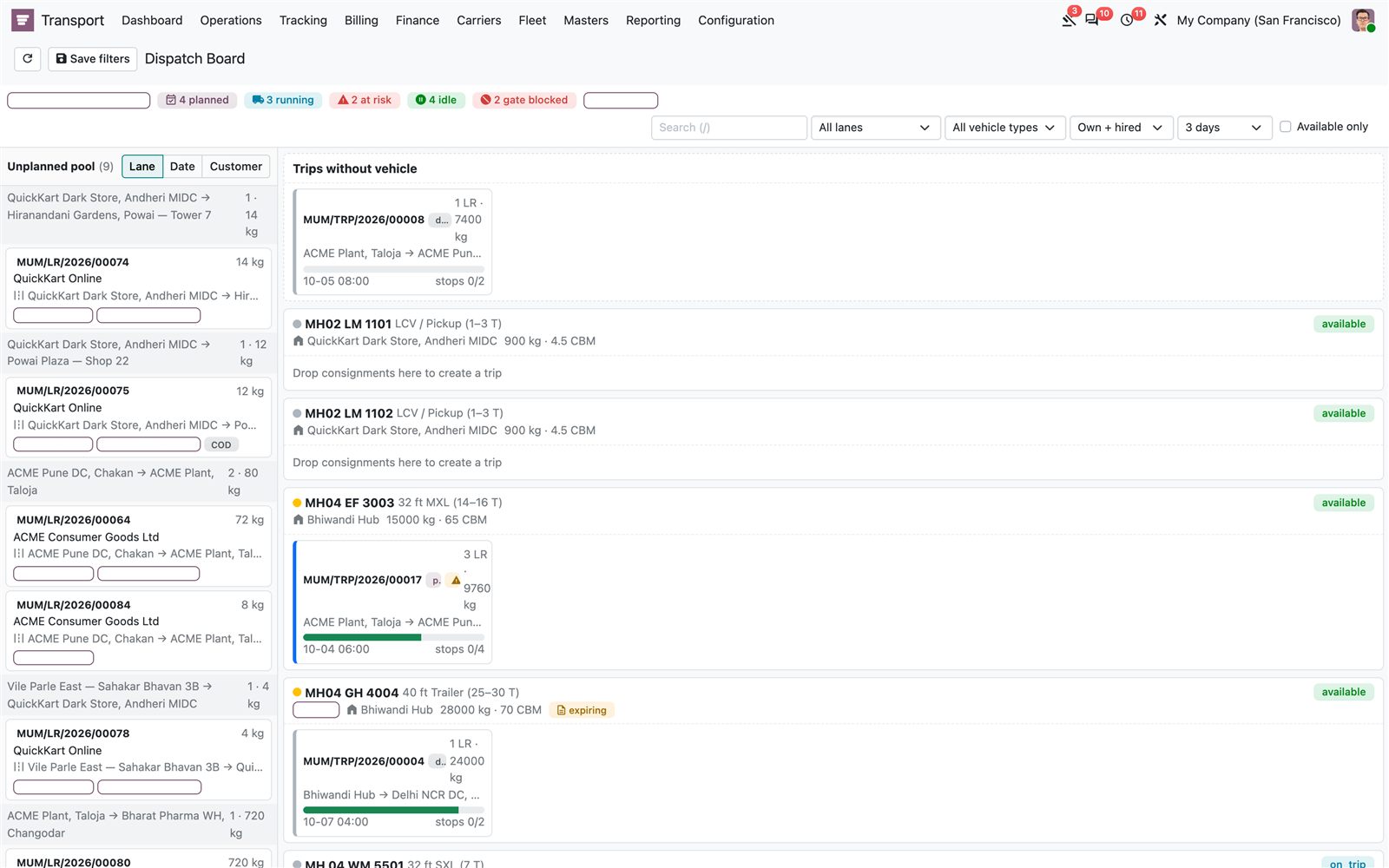
The dispatch board. Unplanned consignments on the left, vehicles and their trips on the right. The chips at the top count planned, running, at-risk, idle and gate-blocked trips.
Real operations are messy, and the suite plans for it. Spot hire raises a purchase order to a carrier, and a breakdown or accident wizard can create a relief trip that takes over the remaining stops and splits the budget by kilometres.
3. Track the vehicle
Positions arrive through provider adapters or the driver app into an append-only log. A geofence engine turns fence crossings into stop arrivals and departures and records the dwell evidence that detention is billed from. An ETA engine corrects the route baseline with live progress, so a promise can turn red before it is missed. An alert engine runs eleven configurable rules, from route deviation and GPS silence to temperature and SOS, and a control tower shows exceptions only, with the one action each case needs.
4. Prove the delivery
This is the step most home-grown setups skip, and it is where disputes start. Each ePOD carries the receiver's name, an on-screen signature (or a witness mode when the consignee refuses to sign), photos, an optional one-time code, and a geo-stamp that flags a large distance from the stop. The split per package is built so that booked quantity always equals delivered plus damaged plus short plus returned.
Submitting the ePOD delivers the consignment. Verifying it opens the billing gate. A query or rejection keeps the gate shut and says why.
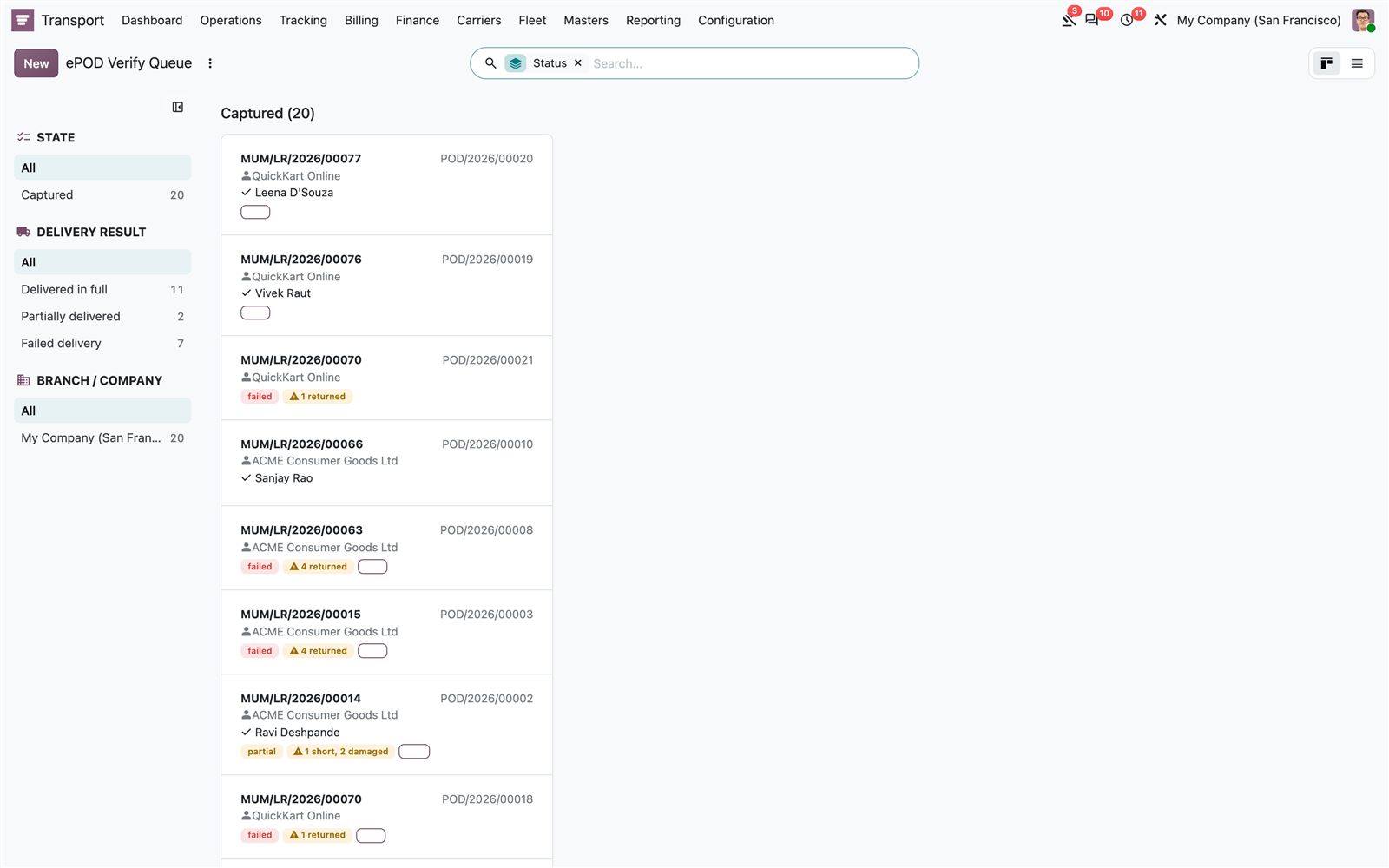
The ePOD verify queue. Captured proofs wait for the back office, filtered by delivery result. Failed and partial deliveries are flagged before anyone raises an invoice.
5. Bill the freight
The billing workbench is where delivered freight becomes cash. It shows the billable pool, the reason each blocked consignment is blocked, and a preview of the batch before anything is posted. You can invoice per consignment, per trip or consolidated. A fingerprint blocks duplicate runs, and a database constraint lets each charge line be billed exactly once. Detention comes from the stored stop dwell, and a waiver keeps the original amount so billed against waived stays visible.
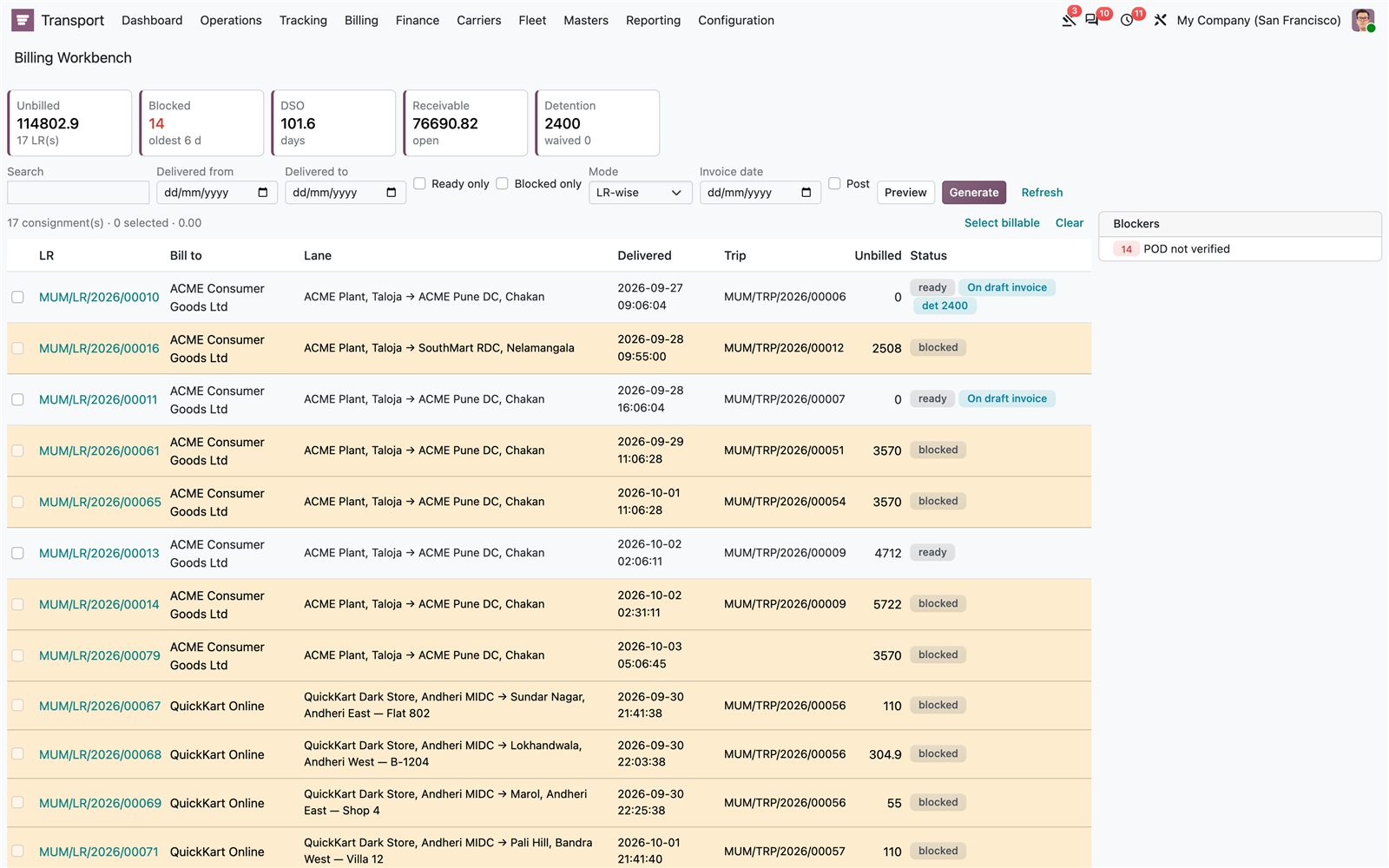
The billing workbench. In this demo, fourteen consignments are blocked for one reason, "POD not verified", which is the gate working as designed.
6. Settle the driver
A trip's cost is cash handed over before departure, receipts brought back, fuel on a card, tolls debited later and money collected from consignees. The listing notes that Odoo has the building blocks for each but nothing that ties them to a trip or reconciles them against a driver. The expense module is that link.
- Driver advances need approval above the company limit and feed a live driver wallet.
- Expenses use the native expense model with automatic trip and fleet analytics, and a receipt hash flags duplicates.
- Fuel is measured tank to tank in km per litre against the vehicle's norm, and outliers raise exceptions.
- Toll statements are matched by vehicle and time, and unmatched entries stay visible in a suspense report.
- Cash on delivery is batched at the end of the day to a control account.
The driver settlement then closes the trip, and it will not close until the balance is discharged within tolerance.
7. Hire in capacity
When your own vehicles are full, hire is native Odoo too: a carrier is a partner, a tender is a purchase requisition, a hire is a purchase order and a self-bill is a vendor bill. Dispatch refuses a hired trip whose carrier is not approved, and a scorecard grades carriers from A to D using only metrics that have evidence behind them.
Which modules to install, and in what order
Forty-eight modules sounds like a lot, but you do not install them all. Install tms_base first. Every other module depends on it and pulls in what it needs. The sequence below is our suggestion for a first rollout, not a requirement.
| Stage and what you get | Modules |
|---|---|
| 1. Core operations. Consignments, dispatch, proof of delivery and invoicing on the same records. | tms_base, tms_order, tms_trip, tms_epod, tms_billing |
| 2. Field and money. Live positions, an offline driver app, advances and settlement, versioned rate contracts. | tms_tracking, tms_driver_app, tms_expense, tms_contract |
| Approvals, service-level clocks, typed exception cases, an audit trail and role dashboards. | tms_approval, tms_sla, tms_exception, tms_audit, tms_dashboard |
| 4. Network and customers. Carrier tendering, a shipper portal, public tracking and a REST API. | tms_carrier, tms_portal, tms_website, tms_api |
| 5. Depth, as needed. Part-load hubs, last-mile runs, load planning, route optimisation and fleet maintenance. | tms_hub, tms_lastmile, tms_load_plan, tms_route_opt, tms_maintenance, tms_tyre |
For go-live, a guided import module loads masters and open freight with validation and rollback. Every module also ships demo data that installs a working network of locations, lanes, vehicles, drivers, tariffs and live trips, so install it on a test database and click through the screens before you touch your own data.
Controls, approvals and the audit trail
Freight is a business where small leaks add up, so most of the suite's depth is control rather than screens.
- Approvals. Multi-level approvals cover rates, discounts, expenses and exceptions, with a proxy for people who are out of office.
- Service-level clocks. Targets exist for pickup, delivery, transit, POD submission and verification, billing, carrier placement, exception resolution and appointments. A predictive breach turns a clock red before the deadline passes.
- Exceptions. Shortage, damage, breakdown and delay are typed cases with an owner, with claims and recovery attached.
- Audit. Logging is configuration-driven, critical events are immutable, and each record has its own timeline.
Country packs and statutory documents
Transport rules differ sharply by country, so the suite keeps them in separate packs instead of baking one country into the core.
- India: the e-Way Bill lifecycle, GST on freight as a goods transport agency bills it, TDS under section 194C, and FASTag statement import. See the official e-Way Bill portal for current rules.
- European Union: the CMR consignment note, the driving-time rules of Regulation (EC) No 561/2006, and cabotage tracking.
- Saudi Arabia: ZATCA e-invoicing, an Arabic waybill and Wasl-ready fields.
- Mexico: Complemento Carta Porte 3.1, built from the trip.
- Brazil: CT-e, MDF-e, CIOT and RNTRC from the consignment and trip.
One point is easy to oversell in this area. According to the listing, the packs assemble statutory documents and never transmit them on your behalf, and in the India pack every government connector ships in mock mode by default. Each pack's README names what a local tax adviser must confirm before go-live. Treat a country pack as a head start, not as sign-off.
What customers and drivers see
The customer portal gives a shipper what they would otherwise phone the desk for: shipments with status and milestones, the tracking link, proof of delivery, documents, invoices, an account statement and a pickup request form. It is scoped to the customer's own consignments by both the controller and an Odoo record rule, and it never exposes cost, margin, carrier or hire-rate data. A public tracking page works by consignment number on a link that expires, and a quote request on your website lands as a quotation on the dispatcher's desk.
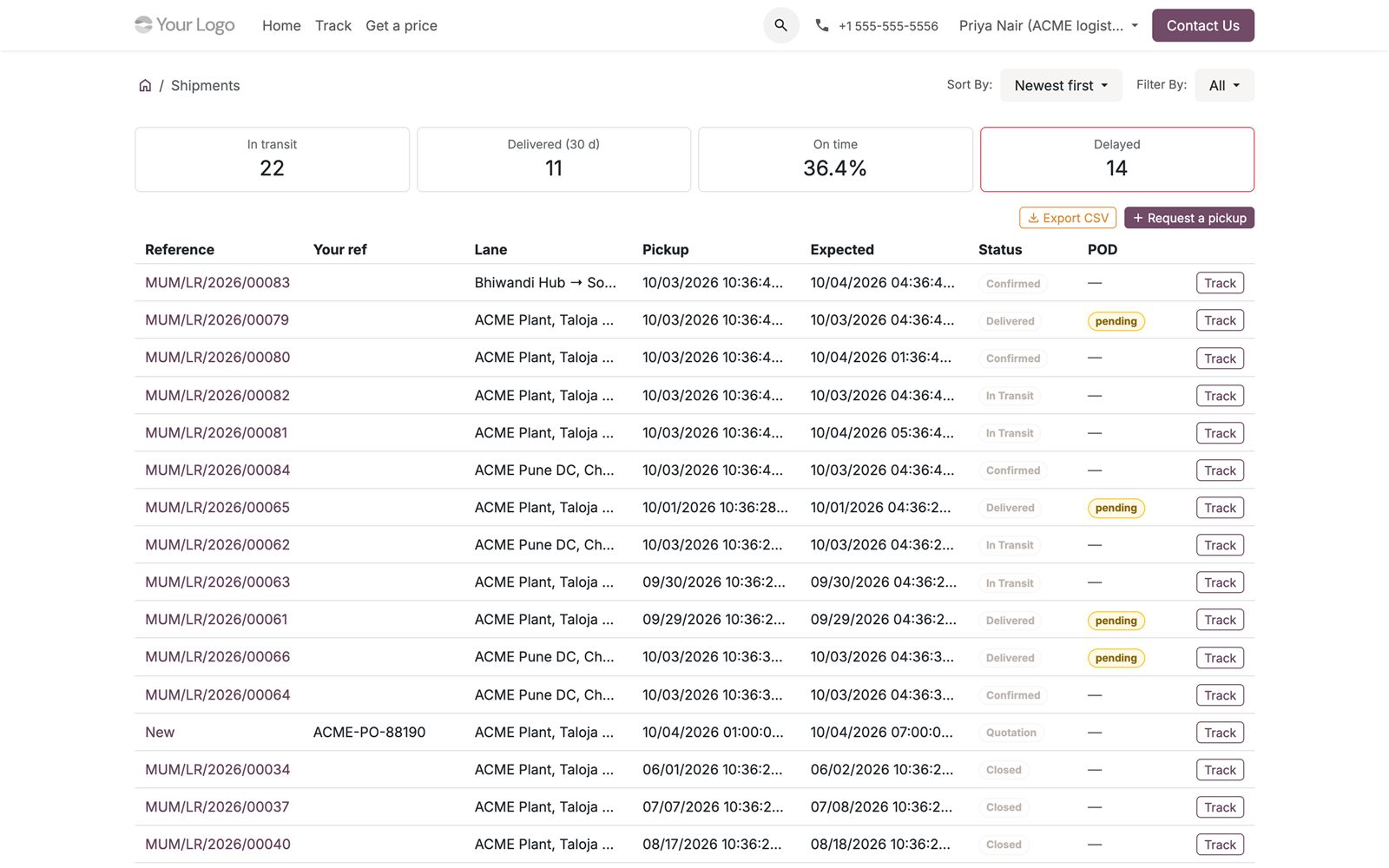
The shipper portal. The same shipment data the desk sees, scoped to the customer's own consignments.
Drivers get an installable progressive web app. They sign in with a phone number and a one-time code, so no Odoo account is needed. Every action is queued on the phone with its own timestamp and replayed when the network returns, so a dead zone does not lose a delivery.
Dashboards and integration
One dashboard serves ten role panels, from Executive and Transport Operations to Trip Profitability, Finance and Fleet and Maintenance. No figure is computed twice: each tile calls the owning module's own method and opens the records behind the number. If a module is not installed, the panel says so instead of showing a zero.
For integration, the API module offers scoped keys with expiry and an IP allowlist, per-minute rate limits, idempotent POST requests and HMAC-signed webhooks with retries. Each key runs as a real Odoo user, so access rights and record rules still apply. The listing counts 140 REST endpoints across the modules.
Where this fits among Odoo TMS options
It helps to be honest about the alternatives. If you want to build your own, the Odoo Community Association publishes an open-source tms module for transport operations with routes, vehicles, crews and orders. At the time of writing, its 18.0 README describes that version as alpha and not for production use, so it suits a team with developers and time. Our suite is a packaged, broader product that goes on to proof of delivery, billing, driver settlement, carrier tendering and compliance packs.
Five questions will tell you which scope you need. Must a vehicle be blocked at dispatch when its documents expire? Should billing wait for verified proof of delivery? Do you settle driver cash, tolls and fuel against each trip? Do you hire outside vehicles and need tenders and self-billing? Do you need statutory documents for a specific country? If most answers are no, for example a handful of vehicles on local deliveries, you may not need a suite of this size.
Pricing and what to check before you buy
The Odoo Apps listing for tms_base states that one purchase covers the whole suite: the core module carries the price of 499 USD and every other module is free and depends on it. Our shop page for the TMS core lists it as a one-time purchase with lifetime updates. Before you buy, check that your Odoo version (19 or 20) is the one listed, which modules you plan to install first, and whether you need an Enterprise bridge.
Frequently asked questions
Does Odoo have a built-in transport management system?
Odoo includes the Fleet app and the Sales, Purchase, Inventory and Accounting apps, which are the building blocks. A consignment note, dispatch board, proof of delivery and driver settlement need an additional module, such as the suite described here.
Does the TMS need Odoo Enterprise?
No. The core is built for Community. Gantt and Map views, Documents, Sign, WhatsApp and Approvals come from separate optional bridge modules that nothing in the core depends on.
Which Odoo versions are supported?
The Odoo Apps store lists the TMS core for Odoo 19 and Odoo 20, and describes both versions the same way.
Can I install only some of the modules?
Yes. Install tms_base first, then add the modules you need. Each one declares its dependencies and pulls in what it requires.
Does it support the India e-Way Bill?
Yes, through the India country pack, which covers the e-Way Bill lifecycle and GST on freight. Its government connectors run in mock mode by default, and a tax adviser should confirm the setup before go-live.
Can drivers use it without a signal?
Yes. The driver app queues every action on the phone and syncs when the connection returns. Replays are idempotent, so an action is not applied twice.
Talk to us
If you run a fleet, a brokerage or a 3PL and want to see this on your own lanes and tariffs, we can walk you through it. Do Incredible Technology also handles Odoo implementation, customisation, migration and support, so a rollout can include loading your masters and open freight. Book a free consultation and tell us how a consignment moves through your business today.